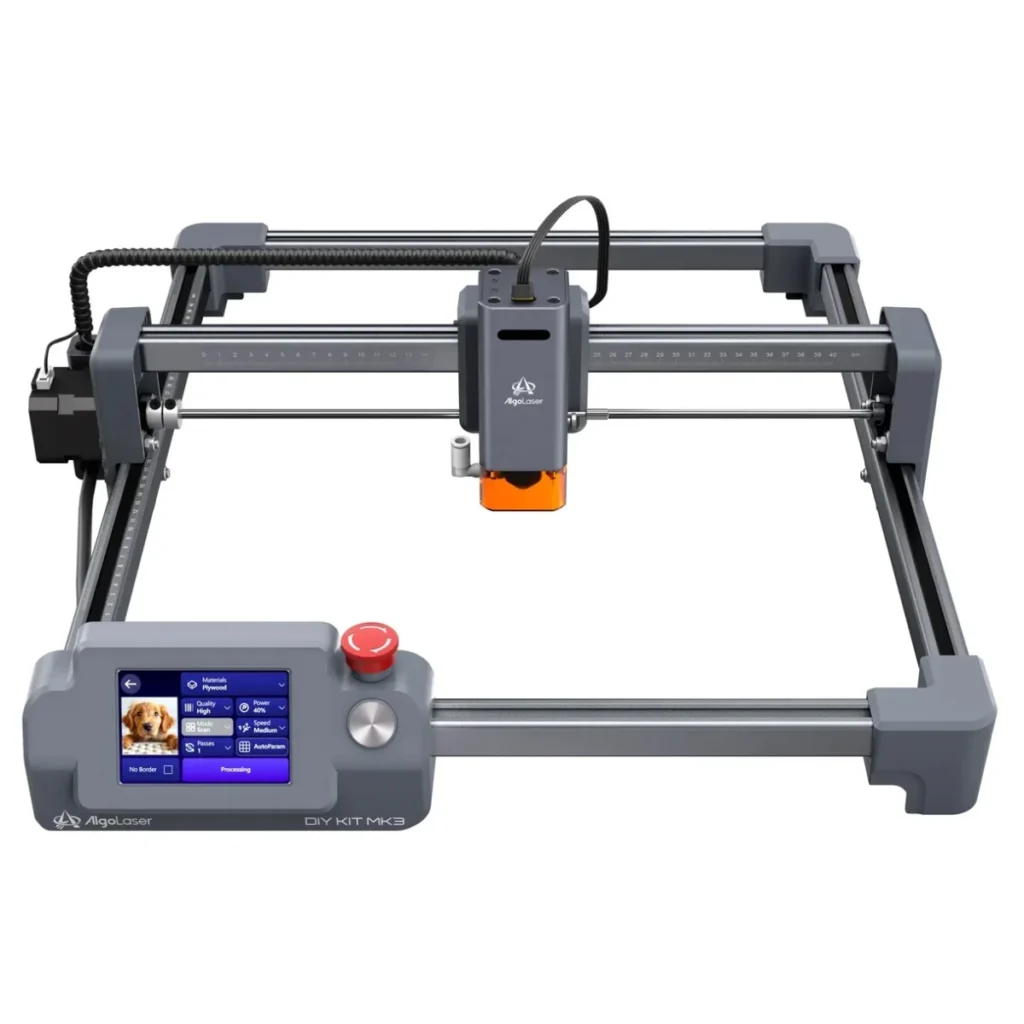
The democratization of desktop manufacturing has reached a significant milestone with the release of the AlgoLaser DIY KIT MK3, a diode laser engraver designed to bridge the gap between entry-level hobbyist kits and professional-grade production tools. As the "maker movement" continues to evolve from simple DIY projects to small-scale commercial ventures, the demand for accessible, high-precision tools has surged. The MK3 enters a competitive market, promising a 95% pre-assembled experience, a robust 400 x 400 mm workspace, and the innovative AlgoOS, which allows for standalone operation. Priced at approximately $569 for the 15W configuration, this machine represents a strategic attempt by AlgoLaser to simplify the often-intimidating workflow of laser engraving without compromising the power and versatility required by serious creators.
The Evolution of the Desktop Laser Market
To understand the significance of the AlgoLaser DIY KIT MK3, one must look at the trajectory of the diode laser industry over the past five years. Historically, laser engraving was divided into two distinct camps: low-power, affordable diode lasers that were often difficult to calibrate, and expensive, high-maintenance CO2 lasers that required dedicated cooling systems and significant space.
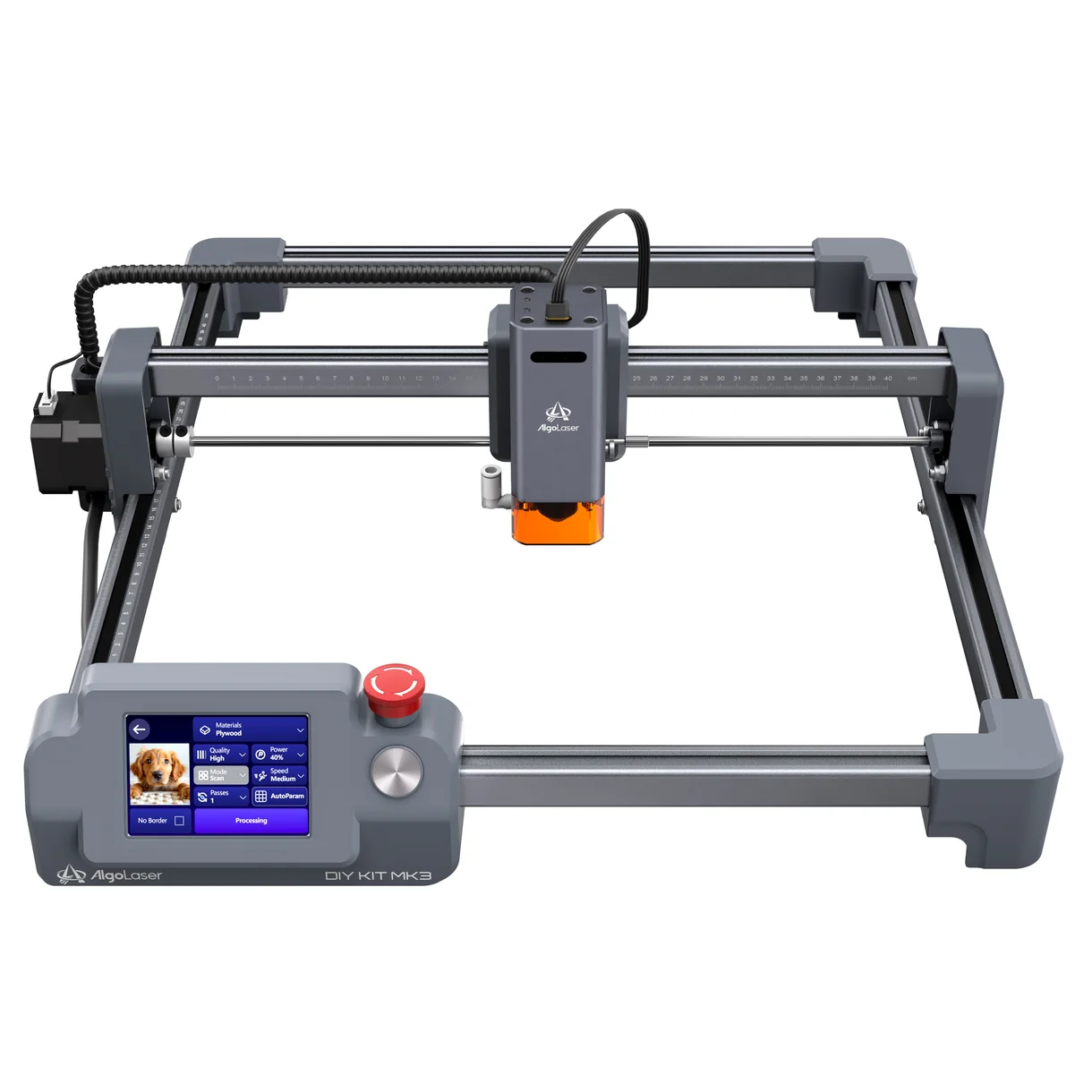
The current generation of diode lasers, led by manufacturers like AlgoLaser, utilizes advanced beam-combining technology to achieve optical power levels that were previously impossible for semiconductor-based systems. By focusing multiple laser diodes into a single, concentrated beam, machines like the MK3 can now cut through materials like plywood and acrylic that were once the sole domain of industrial equipment. The MK3 is offered in three power tiers—8W, 15W, and 20W—allowing users to select a hardware profile that matches their specific needs, whether they focus on high-detail photo engraving or heavy-duty material cutting.
Technical Specifications and Hardware Architecture
The AlgoLaser DIY KIT MK3 is built upon a gantry-style frame, a design choice favored for its balance of stability and cost-effectiveness. The machine features a generous 400 x 400 mm (approximately 15.7 x 15.7 inches) work area, which accommodates medium-sized projects such as custom signage, large cutting boards, and batches of smaller items like coasters or jewelry components.
At the heart of the system is the laser module. The 15W variant tested for this review occupies the "sweet spot" of the lineup, offering enough power to cut through 5mm basswood in a single pass while maintaining a fine enough focal spot for intricate engraving on leather or slate. The machine boasts a maximum movement speed of 15,000 mm/min, though industry experts note that effective working speeds for high-quality engraving typically range between 3,000 and 8,000 mm/min, depending on the material density.

One of the most notable hardware inclusions is the integrated 3.5-inch touchscreen. While many competitors require a constant USB or Wi-Fi connection to a computer running software like LightBurn or LaserGRBL, the MK3’s AlgoOS allows users to load files via an SD card or Wi-Fi and execute jobs directly from the machine. This "offline" capability is a critical feature for workshops where dust, debris, or limited space makes tethering a laptop impractical.
Chronology of Setup and Initial Calibration
The "DIY" moniker in the product name is somewhat of a misnomer, as the machine arrives in a state of near-completion. The assembly process is structured into five primary stages, designed to be completed in under an hour even by those with limited mechanical experience.
- Unboxing and Component Verification: The kit arrives in a high-density foam package, ensuring that the precision-aligned rails and the sensitive laser diode are protected during transit.
- Frame Assembly: The user connects the pre-assembled X and Y axes. This stage requires careful attention to the tension of the timing belts, as improper tension can lead to "ghosting" or loss of detail in the final output.
- Laser Module Installation: The laser head is secured to the carriage. The MK3 utilizes a fixed-focus system with a manual height adjustment, which is set using a metal shim or a built-in focus lever.
- Wiring and Cable Management: The machine features integrated cable routing to prevent the wiring harness from snagging during high-speed movements—a common failure point in cheaper DIY kits.
- Software Synchronization: The final step involves connecting the machine to a network or computer to update the firmware and calibrate the home position.
During testing, the assembly was found to be intuitive, though the manual’s reliance on diagrams over text occasionally required a second look at the orientation of the eccentric rollers. These rollers are vital for ensuring the gantry moves smoothly without wobbling; if they are too loose, the laser will produce distorted lines, and if too tight, the motors may stall or wear prematurely.

Performance Analysis: Engraving and Cutting
The MK3’s performance is characterized by its versatility across a wide range of substrates. In testing environments, the 15W diode demonstrated high competency in wood engraving, producing deep, high-contrast marks with minimal charring when the air assist was engaged.
Wood and Organic Materials
On 3mm birch plywood, the machine achieved clean cuts at 300 mm/min with 100% power. For engraving, the MK3 excels at reproducing grayscale images. By utilizing the AlgoOS’s internal processing, the machine can translate digital images into dithered patterns that simulate depth and shading on wood and leather.
Stone and Ceramics
The 15W laser is powerful enough to permanently etch slate and certain types of ceramic tile. This makes it a viable tool for creating personalized home decor. However, unlike CO2 lasers, diode lasers in the 450nm wavelength range cannot engrave clear glass or transparent acrylic without first applying a dark coating to the surface to absorb the light energy.

Stability and Precision
A critical finding during the review process was the impact of the mounting surface. Because the MK3 uses an open-frame design with a modular protective plate system, it lacks the inherent rigidity of a fully enclosed box. Users are strongly encouraged to mount the machine to a sturdy workbench or a dedicated baseplate. Inconsistent results—such as circles appearing slightly oval—were observed when the machine was placed on a surface that allowed for micro-vibrations during high-speed directional changes.
Safety Considerations and Environmental Impact
As a Class 4 laser product, the AlgoLaser DIY KIT MK3 demands a rigorous approach to safety. The 450nm blue light produced by the diode is extremely hazardous to human eyesight; even a stray reflection can cause permanent retinal damage. While the laser head includes a small protective shield, it does not replace the need for certified laser safety glasses, which must be worn by everyone in the room during operation.
The open-frame nature of the MK3 also presents challenges regarding air quality. Laser engraving is essentially a process of controlled burning, which generates significant amounts of smoke, particulate matter, and Volatile Organic Compounds (VOCs).

- Ventilation: Operating the MK3 in an unventilated indoor space is not recommended. Professional users typically invest in or build an enclosure equipped with a high-cfm (cubic feet per minute) exhaust fan to vent fumes outdoors.
- Fire Safety: Diode lasers are a fire hazard, particularly when cutting flammable materials like wood or paper. The MK3 includes a flame detection sensor that can trigger an alarm and stop the job if a flare-up is detected, but it remains a tool that requires constant human supervision.
Software Ecosystem and Connectivity
The MK3’s software strategy is two-pronged: supporting industry-standard third-party applications while providing a robust proprietary interface.
- LightBurn and LaserGRBL: For power users, the MK3 is fully compatible with LightBurn (paid) and LaserGRBL (free/open source). These programs allow for complex layer management, precise power scaling, and vector manipulation.
- AlgoOS and Mobile App: The built-in touchscreen and the AlgoLaser mobile app target the casual user. The app allows for quick "snap and engrave" workflows, where a user can take a photo with their phone and send it directly to the laser. While convenient, the Wi-Fi connection—limited to the 2.4GHz band—can be prone to interference in crowded signal environments, making the physical USB connection the preferred method for long or complex jobs.
Broader Market Implications and Conclusion
The AlgoLaser DIY KIT MK3 reflects a broader trend in the manufacturing sector: the transition of CNC technology from specialized industrial shops to the "prosumer" desktop. By integrating a dedicated operating system and a touchscreen, AlgoLaser is lowering the barrier to entry for entrepreneurs and hobbyists who may be comfortable with digital design but intimidated by the technicalities of machine control.
The implications for small businesses are significant. At a sub-$600 price point, the MK3 allows craft businesses to bring customization in-house, reducing lead times and increasing profit margins on personalized goods. However, the "true" cost of the machine is higher than the sticker price once the necessary safety equipment—enclosures, fume extractors, and fire suppression tools—is factored in.

In summary, the AlgoLaser DIY KIT MK3 is a high-performance, accessible tool that delivers on its promise of simplified laser engraving. Its strengths lie in its ease of assembly, its standalone operational capability, and the respectable power of its 15W diode. While it requires a dedicated setup for stability and a comprehensive plan for ventilation and safety, it stands as a formidable option for those looking to enter the world of laser manufacturing with a machine that offers room to grow. As the technology continues to mature, the MK3 serves as a benchmark for what a modern, user-centric desktop laser should provide.