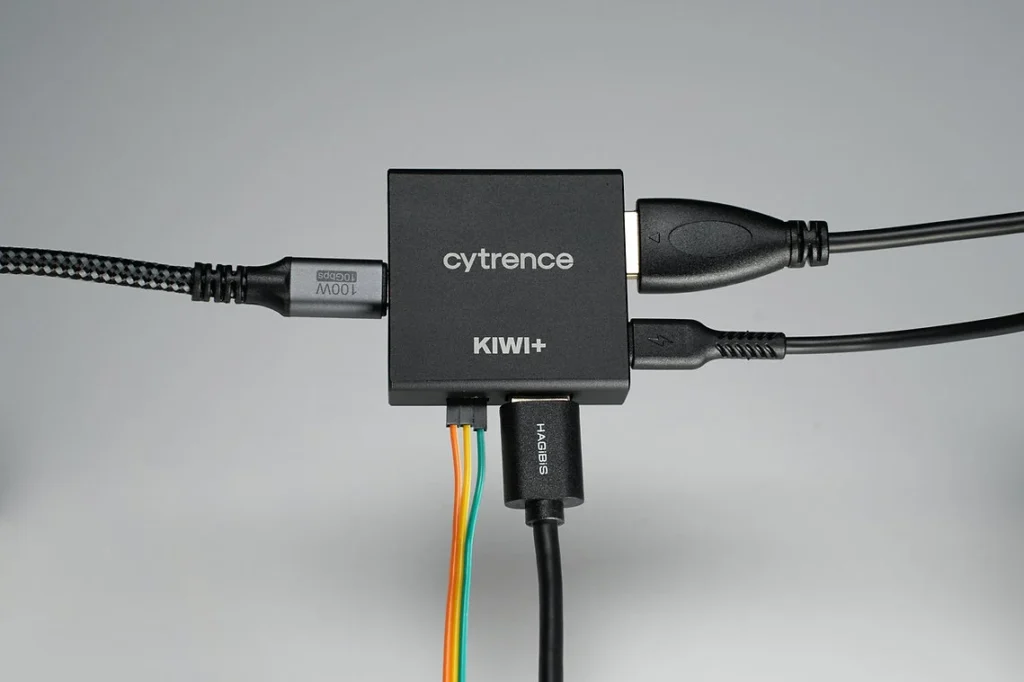
The Cytrence Kiwi emerges as a specialized hardware solution designed to bridge the gap between headless single-board computers and the modern mobile workstation. For developers, engineers, and hobbyists working within the Raspberry Pi ecosystem, the challenge of managing a device without a dedicated monitor, keyboard, or mouse—commonly referred to as "headless" computing—has historically required a compromise between convenience and functionality. While software-based protocols such as Secure Shell (SSH) and Virtual Network Computing (VNC) offer remote access, they are often dependent on pre-configured network settings and functioning operating systems. The Cytrence Kiwi, priced at $119 for the base review unit, aims to eliminate these dependencies by transforming a standard laptop into a comprehensive Keyboard, Video, and Mouse (KVM) console through a direct hardware interface.
The Evolution of Headless System Management
The necessity for a device like the Cytrence Kiwi is rooted in the explosive growth of the Single Board Computer (SBC) market, led primarily by the Raspberry Pi Foundation. Since the launch of the original Raspberry Pi in 2012, millions of these devices have been deployed in environments ranging from industrial automation and edge computing to home media centers and DIY robotics. In a significant portion of these deployments, the device is tucked away in a chassis, mounted on a wall, or integrated into a larger machine, making the connection of a dedicated monitor and keyboard impractical.
Traditionally, when a headless system fails to boot or loses its network configuration, the user is forced to perform a "bench tech" routine: dismantling the setup, bringing the SBC to a desk, and connecting it to a desktop peripheral suite. Alternatively, users might attempt to edit configuration files directly on the SD card using another computer, a process prone to syntax errors and file system corruption. The Cytrence Kiwi addresses this "last-mile" connectivity issue by providing a hardware-level bridge that works regardless of the target machine’s network status or OS health.
Technical Architecture and Model Variations
The Cytrence Kiwi series is structured into several tiers to accommodate different professional requirements. The core functionality remains consistent across the lineup: the device takes an HDMI signal and a USB connection from the "target" machine (e.g., a Raspberry Pi) and converts them into a data stream that is sent via USB-A or USB-C to a "host" laptop. On the host side, a dedicated application displays the target machine’s video output and forwards the laptop’s keystrokes and mouse movements to the target.
Beyond the standard model, the Kiwi Pro introduces features aimed at hardware developers, including General Purpose Input/Output (GPIO) pins. These pins allow for the monitoring of electrical signals or the triggering of hardware resets directly from the management interface. Furthermore, the Kiwi+ line expands the utility of the device into three specialized categories:

- Kiwi+ Drive: This variant functions as a virtualized removable flash storage device. It allows users to transfer up to 32 gigabytes of data by virtually mounting the storage to the host laptop, loading the files, and then "handing off" the mount to the target computer. This is particularly useful for installing drivers or updates on systems without internet access.
- Kiwi+ Net: This model establishes a high-speed network link between the host and the target via the USB connection. It simplifies the process of moving large datasets or performing network-based debugging without needing to configure local area network (LAN) permissions or hardware switches.
- Kiwi+ USB: Designed for peripheral expansion, this model includes an auxiliary USB-A port. This allows a single accessory—such as a specialized sensor, a high-resolution camera, or a backup hard drive—to be toggled between the host laptop and the target SBC.
Performance Standards and User Experience
In practical application, the Cytrence Kiwi distinguishes itself through its plug-and-play simplicity. During testing phases, the device demonstrated a high degree of compatibility across Windows, macOS, and Linux environments. Unlike software-only solutions, the Kiwi allows the user to view the entire boot sequence of the target machine. This is a critical feature for debugging kernel panics, BIOS/UEFI settings, or bootloader issues that occur before a network stack is even initialized.
The latency of the video feed is a primary concern for hardware-based KVMs. The Kiwi maintains a responsive input-to-display loop that is sufficient for terminal navigation, code editing, and even light graphical tasks. While it is not intended for high-frame-rate gaming or professional video editing, the synchronization of audio and video—tested through platforms like YouTube—showed no perceptible lag, indicating efficient data encoding and transmission protocols.
One of the most praised features during the review process was the integrated clipboard sharing. The ability to copy a complex string of code from a web browser on a laptop and paste it directly into the terminal of a memory-constrained Raspberry Pi provides a significant productivity boost. This bypasses the need for the SBC to run resource-heavy applications like Chromium just to access documentation or code snippets.
Comparative Market Analysis
The Cytrence Kiwi enters a market that has seen several DIY and professional-grade competitors. On the high end, professional "Crash Cart" adapters from companies like StarTech have existed for years, often retailing for $300 to $500. These devices are ruggedized for data center use but are often cost-prohibitive for individual makers or small engineering teams.
On the DIY side, projects like "Pi-KVM" allow users to build their own KVM-over-IP solutions using a Raspberry Pi 4 and an HDMI-to-CSI bridge. While Pi-KVM is highly powerful and offers remote access over the internet, it requires a significant amount of setup, additional hardware, and a permanent network connection to the device being managed. The Cytrence Kiwi occupies a middle ground, offering the portability and ease of a commercial product at a price point ($119) that is competitive with the total cost of parts for a DIY high-end KVM setup.
Industrial and Educational Implications
The implications of the Kiwi extend beyond the hobbyist’s workbench. In industrial settings, where technicians must maintain dozens of isolated "edge" nodes, a portable KVM can reduce downtime significantly. Instead of carrying a monitor and a keyboard through a factory floor, a technician can carry a laptop and a Kiwi, gaining instant console access to any machine.

In educational environments, the Kiwi facilitates a cleaner classroom setup. Students can work on their own laptops while interacting with a Raspberry Pi tucked away in a corner of their desk, reducing cable clutter and the need for expensive lab monitors. This "single-screen" workflow is increasingly favored in modern STEM curricula where desk space is at a premium.
Chronology of Development and Future Outlook
The development of the Cytrence Kiwi reflects a broader trend in the electronics industry toward "USB Gadget" mode and high-speed serial data transformation. As USB-C becomes the universal standard for power and data, the hardware required to capture 1080p video and emulate HID (Human Interface Device) peripherals has shrunk in size and cost.
Cytrence has indicated that while some features, such as the experimental file-sharing protocol, are still being refined, the core hardware architecture is robust. Future firmware updates are expected to address the minor "bugginess" reported in the experimental features, potentially expanding the Kiwi+ Drive’s capacity or improving the seamlessness of the Kiwi+ Net’s bridging.
Final Technical Summary
The Cytrence Kiwi represents a maturation of the maker toolset. By providing a reliable, driverless hardware interface for headless systems, it removes one of the most persistent friction points in SBC development. Its support for multiple operating systems and its various specialized models (Pro, Drive, Net, USB) ensure that it can find a place in the kits of both casual enthusiasts and professional systems administrators.
As the Raspberry Pi and its competitors continue to move into more sophisticated roles in artificial intelligence and automation, the need for "bare-metal" access tools like the Kiwi will only grow. For $119, the device offers a significant return on investment in the form of saved time and reduced frustration, solidifying its position as a recommended tool for anyone regularly engaging with headless computing architecture. The shift toward such integrated, portable diagnostic tools suggests a future where the "crash cart" is no longer a heavy piece of equipment, but a pocket-sized adapter that leverages the power of the laptop already in the user’s bag.