The Cytrence Kiwi has emerged as a specialized hardware solution designed to bridge the gap between portable laptops and headless computing environments, providing a streamlined alternative to traditional remote access protocols. For years, developers, system administrators, and hobbyists working with Single Board Computers (SBCs) like the Raspberry Pi have faced a recurring logistical hurdle: how to efficiently interact with a device that lacks a dedicated monitor, keyboard, or mouse. While software-based solutions such as Secure Shell (SSH) and Virtual Network Computing (VNC) have long been the industry standard, they are often dependent on pre-configured network settings and functional operating system environments. The Cytrence Kiwi series, starting at a retail price of $119, offers a hardware-level intervention that transforms a standard laptop into a comprehensive KVM (Keyboard, Video, Mouse) console, effectively eliminating the need for bulky external peripherals or complex network configurations.
The Evolution of Headless System Management
Headless computing refers to any computer system or device that operates without a graphical user interface (GUI) or local peripherals. This setup is common in server rooms, industrial automation, and the burgeoning "Maker" movement, where Raspberry Pis and similar SBCs are embedded into projects ranging from home automation hubs to edge-computing clusters. Historically, managing these systems required one of three methods: connecting a physical monitor and keyboard, accessing the device via a network-based terminal (SSH), or removing the storage media (such as an SD card) to modify configuration files on a separate machine.
Each of these methods carries significant drawbacks. Physical setups are cumbersome and counter-intuitive for mobile work or compact projects. Network-based access is only possible if the target machine has already successfully booted and joined a network—a "catch-22" scenario when the primary goal is to troubleshoot a failed boot or a network connectivity issue. The Cytrence Kiwi addresses these specific pain points by providing a direct, hardware-to-hardware link. By utilizing the laptop’s own display and input devices, the Kiwi creates a "window" into the target machine that remains active from the moment of power-on, allowing users to view BIOS settings, boot sequences, and kernel logs in real-time.
Technical Specifications and Hardware Architecture
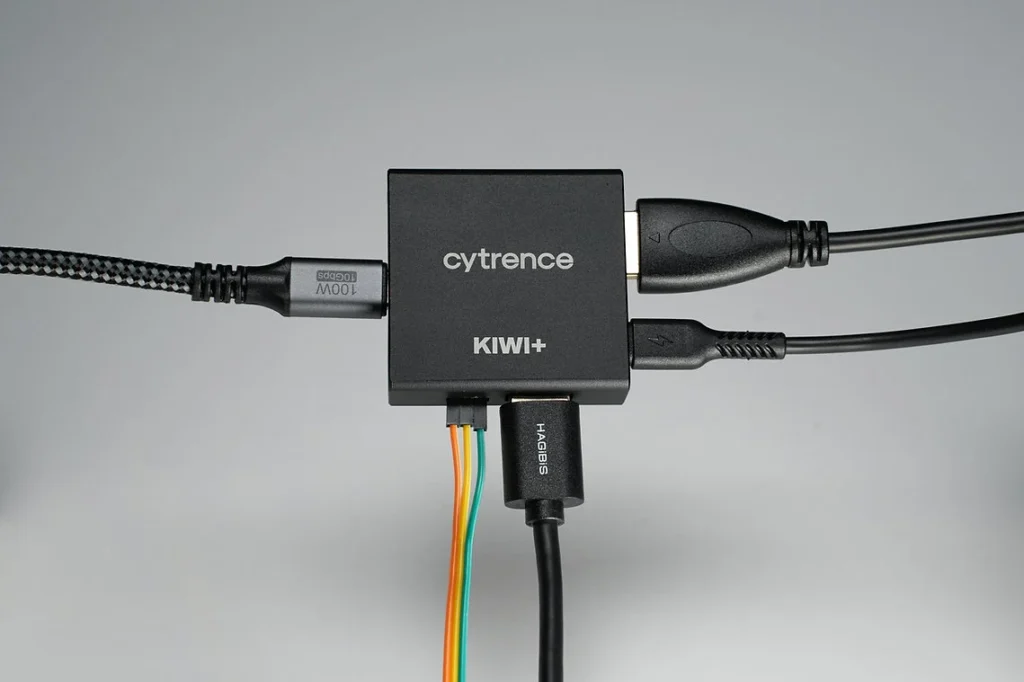
The Cytrence Kiwi functions as a sophisticated bridge. The device features an HDMI input and a USB input intended for the "target" machine (the device being managed), and a USB 3.0 output that connects to the "host" machine (the user’s laptop). This architecture allows the host machine to recognize the Kiwi as a standard video capture device and a composite HID (Human Interface Device).
During performance testing, the device demonstrated high responsiveness suitable for a variety of professional and creative tasks. While not designed for high-refresh-rate gaming, the latency is sufficiently low to support fluid navigation of desktop environments and responsive terminal typing. One of the most significant technical hurdles in digital KVM solutions is the synchronization of audio and video; the Kiwi manages this through optimized data throughput over USB 3.0, ensuring that audio from platforms like YouTube or system alerts is delivered with no perceptible lag.

Furthermore, the Kiwi facilitates a shared clipboard experience. Users can copy code snippets or configuration strings from a web browser on their laptop and paste them directly into the terminal or text editor of the target machine. This feature is particularly valuable when working with resource-constrained SBCs that may struggle to run modern, memory-intensive web browsers like Chromium.
A Diversified Product Ecosystem: Pro and Plus Models
Recognizing that different professional environments require varying levels of functionality, Cytrence has expanded the Kiwi line into several specialized models. This tiered approach allows users to select a device that matches their specific workflow requirements, whether they are focused on simple maintenance or complex hardware development.
The Kiwi Pro: Documentation and Hardware Interaction
The Kiwi Pro is positioned as the tool of choice for developers who need to document their processes or interact with hardware at a lower level. It includes integrated features for capturing high-quality screenshots and video recordings of the target machine’s output, which is essential for creating tutorials, bug reports, or compliance documentation. Additionally, the Pro model incorporates General Purpose Input/Output (GPIO) pins, allowing developers to interface with external sensors or circuits directly through the KVM bridge.
The Kiwi+ Series: Storage, Networking, and Peripheral Sharing
The "Plus" series introduces three distinct modules designed to solve specific data-handling challenges:
- Kiwi+ Drive: This model functions as a virtualized removable flash storage device. It allows users to transfer up to 32 gigabytes of data by virtually mounting the storage to the host machine, loading the files, and then virtually re-mounting it to the target computer. This "sneakernet" approach is digitized, providing a secure way to move files between machines without relying on a shared network or physical USB stick swapping.
- Kiwi+ Net: This variant establishes a direct network link between the host and target machines. It is optimized for high-volume data transfers and batch processing, creating a private, high-speed bridge that bypasses the limitations of standard local area networks.
- Kiwi+ USB: Designed for peripheral versatility, this model allows a physical USB accessory—such as a specialized sensor, a high-capacity backup drive, or a camera—to be plugged into the Kiwi. The user can then toggle which system (host or target) has access to the device, facilitating seamless hardware testing and data acquisition.
Industry Implications and Market Analysis
The release of the Cytrence Kiwi series comes at a time when the global Single Board Computer market is experiencing unprecedented growth. According to industry analysts, the market for SBCs is expected to reach billions of dollars by the late 2020s, driven by the rise of Artificial Intelligence at the edge and the continued expansion of the Internet of Things (IoT). As more industries adopt headless computing, the demand for "crash-cart" alternatives—portable tools that replace the traditional cart-mounted monitor and keyboard used in data centers—has intensified.
The Kiwi series competes in a niche but vital market. Its primary competition includes open-source DIY projects like PiKVM and commercial rack-mount KVM-over-IP solutions. However, the Kiwi distinguishes itself through its portability and "plug-and-play" nature. Unlike PiKVM, which requires the user to build and configure their own hardware using a Raspberry Pi, the Kiwi is a purpose-built, consumer-ready peripheral. This makes it an attractive option for IT departments that require standardized, reliable tools for field engineers.

Field Use and Reliability
For field engineers and systems integrators, the weight and complexity of a toolkit are critical factors. Traditional methods of debugging a remote server often involve hauling a "crash cart" to a server rack. The Kiwi effectively replaces this entire setup with a device small enough to fit in a pocket.
Early reports from users in the field indicate that the device’s cross-platform compatibility is one of its strongest assets. Because it utilizes standard UVC (USB Video Class) and HID drivers, it does not require the installation of proprietary software or drivers on the target machine. This is a crucial feature for professionals working in high-security environments where installing unverified software is strictly prohibited. The Kiwi has been confirmed to work seamlessly across Windows, macOS, and various Linux distributions, including Debian, Ubuntu, and Arch Linux.
While the "experimental" file-sharing features in early versions of the firmware were noted to have minor bugs, the dedicated Kiwi+ Drive model has proven to be a robust solution for file transfers, succeeding in environments where traditional network sharing protocols (like SMB or FTP) were blocked by firewalls or local security policies.
Conclusion: A New Standard for Portable KVMs
The Cytrence Kiwi represents a significant step forward in the democratization of hardware management tools. By consolidating the functionality of a monitor, keyboard, and mouse into a compact USB peripheral, it empowers developers to work more efficiently and reduces the barriers to entry for complex headless projects.
As the series continues to evolve, the integration of features like GPIO access and virtualized storage suggests that Cytrence is looking beyond simple KVM functionality toward a more holistic "Swiss Army Knife" for the modern computer engineer. At a price point of $119, it sits as a premium but justifiable investment for professionals who frequently find themselves in the "awkward" position of needing to talk to a machine that has no way of talking back. Whether for the hobbyist finishing a home-server project or the sysadmin maintaining a fleet of industrial controllers, the Kiwi series offers a level of convenience and reliability that sets a new benchmark for the industry.